


MangaMuse:AceToon Lite & Comic
4.460.00 Reviews
App Specs
- Version
- 1.7.16
- Updated On
- License
- Free
- Downloads
- 500,000+
- Developer
- FairfaxAngelic
- Categories
- Comics
- Platform
- Android
Screenshots
 Analysis by AppCompare
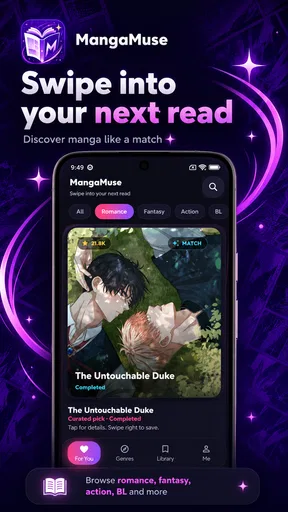
Choosing a manga reader is less about finding the longest feature list and more about finding a comfortable way to keep reading. I judge one by how easily I can settle into a chapter, return to a series I care about, and avoid turning a short break into a bout of app management. MangaMuse:AceToon Lite & Comic is a free comics app from FairfaxAngelic, aimed at readers who want manga and webtoons in a clean, dark presentation, with a simple swipe-based way to save favorites.
My first impression is that this is best approached as a lightweight reading companion, not as a promise of a particular library or a full-featured comics platform. If you enjoy browsing on your phone and want favorite titles close at hand, the idea is appealing. If you need a tightly organized collection, dependable offline access, or a particular publisher’s catalog, those needs should guide your choice before the app’s look does.
What matters when choosing a manga reader
When I choose a manga reader, I look beyond its first-screen appeal and ask whether it fits the way I actually read: in short breaks, longer sessions, or a mix of both. I also weigh comfort against organization, since a pleasant browsing flow matters less if I struggle to return to a series. That balance is what makes MangaMuse’s particular approach worth considering.
Reading comfort comes before the feature count
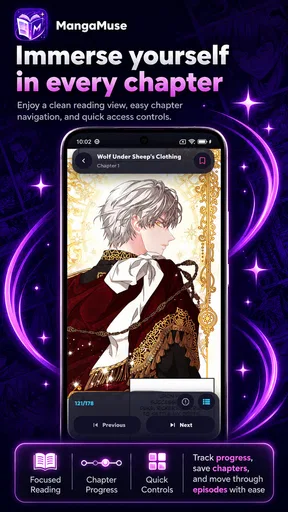
On a phone, the small decisions shape the whole experience: whether the screen feels restful at night, whether you can move between discovery and reading without losing your place, and whether saving a promising series takes little effort. MangaMuse puts emphasis on a dark theme and quick saving, two choices that suit casual browsing as well as regular reading. The dark appearance is especially welcome when I am reading in a dim room, though it is a matter of comfort and taste rather than a substitute for good page controls.
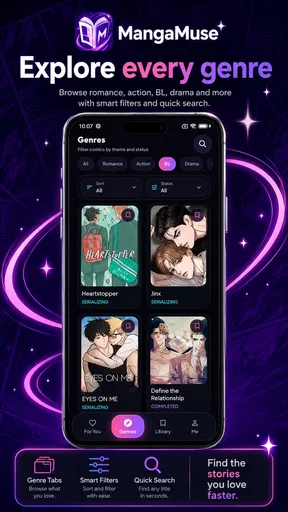
The app’s stated focus spans manga and webtoons, which makes it potentially useful for readers who move between page-based comics and vertically paced stories. Those formats invite different habits. Manga often rewards a deliberate page-by-page rhythm; a webtoon is more naturally read as a continuous scroll. I would choose a reader that handles the format I use most gracefully, rather than assuming that supporting both means every title will feel equally convenient.
Decide how you want to manage your reading
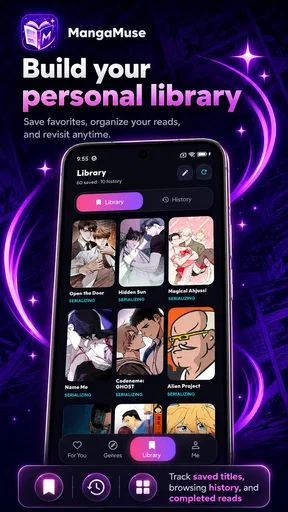
Saving favorites with a swipe sounds small, but it can change how I browse. Instead of interrupting discovery to build a detailed library, I can mark something to revisit and keep moving. That is useful when I am exploring unfamiliar series or have only a few minutes to look around. It is less compelling if I already maintain a carefully labeled collection and expect sorting, progress tracking, or cross-device organization to be central to the experience.
A practical test is to imagine what happens after you save several titles. Can you distinguish a series you are actively reading from one you merely want to try? Does returning to a favorite feel immediate? Those are the questions I would answer during an early session. A quick save gesture is a good starting point, but the long-term value depends on whether it supports your own reading routine.
Worth Reading Before You Choose

Flipboard Shows What News Apps Must Do Beyond the Feed

Switching to Android Auto Means Rethinking Your Driving Routine

Google Calendar Makes a Crowded Week Easier to Manage

Ludo King Makes the Most of the Minutes Between Plans

Baby Panda World Brings Quick Play to Modern Phones, but Its Game Library Feels Busy

ESPN’s Live Game View Makes Following Close Games Easier
Who is likely to enjoy it
I can see MangaMuse suiting readers who mostly read on a phone, like a darker interface, and want a low-friction way to collect interesting manga and webtoons. It may also work for someone who is new to reading comics digitally and would rather explore at their own pace than configure a complex personal library from the outset.
Readers who depend on a specific official catalog, need robust download and synchronization tools, or prefer bright pages and extensive display controls should be more cautious. Those are not minor preferences: they can determine whether an app becomes part of a daily routine or gets abandoned after a couple of chapters.
Where MangaMuse feels like a good fit
I see MangaMuse as most promising when I want to browse without turning every discovery into a commitment. Its quick-saving idea can be useful for collecting possibilities during a spare moment, while the dark presentation may suit evening reading. In this section, I’d focus on whether those small conveniences support a repeatable habit, not just a pleasant first impression.
A dark reading environment for spare moments
The dark theme gives the app a clear identity without making the review hinge on appearance alone. I find dark interfaces useful for evening reading and for quick sessions in low light, such as checking a chapter while waiting for a ride. In a brighter setting, the same choice may not be everyone’s favorite, so I would pay attention to personal comfort rather than treating dark mode as automatically better.
One useful habit is to separate browsing from reading. When I have only a short break, I can use swiping to save a title that catches my attention and leave the actual reading for a calmer moment. That avoids starting a chapter I cannot finish and makes discovery feel less like an obligation. It is a simple workflow, but it suits an app built around fast favoriting.
Useful for readers who follow more than one format
Because MangaMuse is presented around manga and webtoons, it is worth considering if your reading changes with your mood. I might want a focused sequence of pages at home and a quick vertical episode while commuting or taking a lunch break. Keeping both kinds of comics in one reading destination can make that shift easier, provided the titles you personally want are available and the controls feel right for each format.
Here is a realistic everyday case: I have ten minutes before an appointment, open the app, and browse instead of committing to a long reading session. I save a series that looks promising, then return later when I have time to follow it properly. That is where a fast favorite gesture can earn its place. It reduces the small friction of remembering what caught my eye, without requiring me to plan an elaborate reading queue.
A modest entry point rather than a commitment
The app is free, so trying it does not require paying up front. That makes it reasonable to test against your normal routine: search or browse for the kind of comics you enjoy, save a few, and see whether returning to them feels natural. Free access is a practical advantage, but I would not infer from that alone that every title, feature, or reading situation will match what you expect.
MangaMuse has an average rating of 4.5 from around 5,200 ratings, with about 35 written reviews. It has passed 100,000 installs, which suggests that it has found an audience, though popularity cannot tell me whether its reading style suits a particular person. I would treat those figures as background and make the decision based on actual comfort, catalog relevance, and the way I want to keep track of series.
What to check in your first session
Rather than spending the first visit swiping through everything, I would test a few specific things. Find a title in the format you read most, open a chapter, and see whether the pacing and screen presentation feel comfortable. Then save a second title and check how easily you can locate both again. This small trial tells you more than a long browse, because it covers discovery, reading, and return visits in one go.
Also consider the conditions under which you read. If you often read without a reliable connection, make sure your preferred workflow works before depending on the app for a trip or commute. If you share a device or switch between devices, check whether your favorites and progress remain convenient for your own setup. These are practical decision points, not reasons to assume the app will or will not meet a particular need.
When another kind of app may suit you better
I wouldn’t treat one app as the right home for every comic habit. A reader centered on a particular publisher, a broad digital library, or a browser-based routine may better suit someone with a clear source or collection preference. I’d compare those categories by what they make easiest for me, especially when a specific title or more deliberate organization matters.
Official publisher apps and broad comic readers serve different priorities
The usual alternatives fall into a few broad groups. A publisher’s own reader can be a better choice when you already know which publisher or series you want and care most about that source. A general digital-comics library may suit someone who wants a collection organized across many kinds of comics. A browser-based reading option can be preferable for people who do not want another app in their routine. These are category-level trade-offs, not claims about any specific competitor’s catalog or features.
MangaMuse’s appeal is its focused, casual combination of manga, webtoons, dark presentation, and quick saving. That makes it easier to recommend as a place to explore than as a one-size-fits-all replacement for every comics service. If your main goal is to follow a particular official release schedule, prioritize the source that reliably serves that series. If your main goal is comfortable phone browsing and a handy favorites habit, MangaMuse is more directly aligned with that use.
Where the simple approach can become limiting
Fast favoriting is not the same as deep collection management. Readers with dozens of ongoing titles may want clearer ways to sort by status, separate finished stories from new discoveries, or review progress at a glance. If those tasks are important to you, try to confirm that your preferred organization is comfortable before moving a large reading habit over. A streamlined interface can feel refreshing at first and restrictive later if it leaves too much tracking to memory.
There is also a trade-off in using a single app for different kinds of comics. One destination is convenient, but the reading experience still needs to suit each format. I would not choose it solely because it brings two categories together; I would check whether the titles I want are easy to find and whether both vertical scrolling and page-based reading feel natural in practice. If one format dominates your routine, an app specialized around that format may be a better match.
Age suitability and device fit
MangaMuse is rated for teens, so I would take that audience guidance seriously when deciding whether it is suitable for a younger reader. An age rating is a useful starting point, but parents should still consider the individual’s maturity and the material they intend to read. For adults choosing an app for a family device, it is sensible to review the reading environment together rather than assuming every comic will be appropriate for every reader.
The current version is 1.7.13, and the listed minimum operating system is 7.0. Before installing, I would check that the device meets that requirement and that the app runs comfortably on its screen. The release date is June 12, 2026; for my own decision, the practical point is to make sure the version available on my device is current and behaves well, rather than treating a version number as a guarantee of a particular feature set.
Switching without disrupting your reading habit
Before changing readers, I’d try the new routine alongside the old one rather than moving everything at once. A small test with a few discoveries lets me judge whether saving and finding them again feels natural, without disrupting the series I already follow. That approach also helps reveal whether MangaMuse is a useful companion or a genuine replacement for my usual setup.
Try it beside your current reader first
I would not move an established collection all at once. Start by using MangaMuse for a few new discoveries and one or two series you are comfortable testing. That gives you a fair comparison without risking the convenience of your existing setup. Notice how long it takes to return to a saved title, whether the dark presentation remains comfortable across a full chapter, and whether the app fits the moments when you actually read.
This trial also helps answer a common practical question: should MangaMuse replace your current app or sit alongside it? If you enjoy its browsing and saving flow but rely on another service for a particular series or a more structured library, keeping both may be the sensible choice. Switching only makes sense when the new routine is genuinely easier, not just because a different interface feels fresh for a day.
Keep your expectations tied to your own needs
When testing any comics app, I make a short list of what I will not compromise on: access to the titles I read, legibility on my screen, a comfortable way to navigate chapters, and a reliable method for finding my place again. MangaMuse’s dark theme and swipe-to-save approach address the browsing and comfort side of that list. The remaining questions are personal, so I would answer them through use rather than assume that a concise description covers every reading preference.
One less obvious benefit of a brief trial is learning whether saving titles actually reduces decision fatigue. If I save too freely, a long favorites list can become another pile to sort through. I would use the gesture selectively: keep titles I truly plan to sample, and clear out ones that no longer interest me. This makes the app’s quick collection habit more useful and prevents discovery from becoming clutter.
My recommendation for MangaMuse
MangaMuse:AceToon Lite & Comic is worth trying if you want a free, phone-friendly place to explore manga and webtoons, prefer a dark reading environment, and value quick saves over elaborate library management. FairfaxAngelic has kept the app’s central idea easy to understand, and the combination makes sense for readers who browse in short bursts and return to favorites later.
I would skip it as my only comics app if I needed a particular publisher’s catalog, extensive organization, or a reading setup that I already know another service handles better. I would also avoid switching a large collection before testing how comfortably I can locate and continue the titles I care about. The strongest recommendation is to try it with a small, real reading routine rather than judge it by a quick glance.
For a teen or adult who wants to dip into comics on a phone without paying to begin, MangaMuse is a reasonable option to explore. Its rating of Teen is an important consideration for families, while its 100K-plus installs and solid average suggest that many readers have found it worth a look. My verdict is positive but specific: choose it for casual discovery and a simple favorites workflow, and choose a more specialized alternative if catalog certainty or detailed tracking matters more than ease of browsing.
Pros
- Provides a lightweight option for readers who want a simpler comic app.
- A broad range of manga and comic titles may appeal to varied tastes.
- Digital reading lets you carry multiple stories without physical books.
- Convenient for browsing comics during short breaks or while traveling.
- Useful for readers looking to discover titles beyond familiar series.
Cons
- The catalog and available chapters may vary by region or over time.
- Reading options may feel limited compared with dedicated e-reader apps.
- A smaller app footprint can mean fewer advanced customization features.
- Some titles may require an internet connection to read.
- Content availability and translation quality may differ between series.
FAQs for MangaMuse:AceToon Lite & Comic
What is MangaMuse:AceToon Lite & Comic?
MangaMuse:AceToon Lite & Comic is presented as an app for discovering and reading manga, manhwa, or other comic-style stories on a mobile device. The “Lite” name suggests a streamlined experience, but the exact catalog and features can vary by version and region. Before downloading, check the app’s description and screenshots to confirm that its genres, languages, and reading options match what you’re looking for.
Is MangaMuse:AceToon Lite & Comic free to use?
The app may be free to download, but that does not necessarily mean every story or feature is available at no cost. Some reading apps support their catalogs through advertising, in-app purchases, subscriptions, or paid chapters. Review the store listing and the app’s payment information before using it, and check whether any trial renews automatically so you understand potential charges in advance.
Do I need an account or an internet connection to read comics?
Account requirements and offline-reading support can differ between app versions. You may be able to browse or read some content without signing in, while saving favorites, syncing progress, or accessing certain chapters could require an account. Many comic apps also need an internet connection to load pages. Check the app’s current feature details, and avoid assuming that downloaded chapters will remain available offline.
How can I check whether MangaMuse:AceToon Lite & Comic is safe and suitable for me?
Before installing, download the app only from an official app store and review its developer information, recent update history, user feedback, and requested permissions. Pay particular attention to permissions that do not seem necessary for reading comics, as well as the privacy policy and data-safety disclosures. Parents should also check the app’s content rating and the themes in its catalog before allowing younger readers to use it.
Is MangaMuse:AceToon Lite & Comic available on both Android and iOS?
Availability depends on the developer’s current distribution and on your country or region. Search for the exact app name in Google Play or Apple’s App Store and verify that the developer and listing details match before downloading; similarly named apps may be unrelated. If you cannot find an official listing for your device, avoid unofficial download files, which may be outdated or pose security risks.


